Не попадитесь на накрученные каналы! Узнайте, не накручивает ли канал просмотры или
подписчиков
Проверить канал на накрутку


Телеграм канал «QA Community»

QA Community
1.4K
790
47
8
0
You can find it here:
- news
- real cases
- meetups and talks
- internship programs
- and sparkling humor
Cooperation: @evgeniybryk
FB channel: https://www.facebook.com/people/QA-Community/100086298857628
- news
- real cases
- meetups and talks
- internship programs
- and sparkling humor
Cooperation: @evgeniybryk
FB channel: https://www.facebook.com/people/QA-Community/100086298857628
Подписчики
Всего
4 730
Сегодня
0
Просмотров на пост
Всего
529
ER
Общий
11.19%
Динамика публикаций

Telemetr - сервис глубокой аналитики
телеграм-каналов
телеграм-каналов

Получите подробную информацию о каждом канале
Отберите самые эффективные каналы для
рекламных размещений, по приросту подписчиков,
ER, количеству просмотров на пост и другим метрикам
рекламных размещений, по приросту подписчиков,
ER, количеству просмотров на пост и другим метрикам

Анализируйте рекламные посты
и креативы
и креативы
Узнайте какие посты лучше сработали,
а какие хуже, даже если их давно удалили
а какие хуже, даже если их давно удалили

Оценивайте эффективность тематики и контента
Узнайте, какую тематику лучше не рекламировать
на канале, а какая зайдет на ура
на канале, а какая зайдет на ура

Показано 6 из 1 440 постов
Смотреть все посты
Пост от 14.10.2026 15:33
107
0
0
💣 ZIP Bomb: How a 4 KB File Can Take Down a System
Can a 4 KB file crash an application? Yes — if it's a ZIP bomb.
For QA engineers, it's a reminder that file upload testing involves much more than checking extensions and size limits.
⚙️ How Does a ZIP Bomb Work?
ZIP uses algorithms like DEFLATE to compress data. A single DEFLATE stream has a theoretical expansion limit of roughly 1032:1 under specific constraints, but this doesn't limit the expansion of an entire ZIP archive.
ZIP bombs exploit two techniques:
- Nested archives: Each extraction level multiplies the output size. The famous 42 zip archive is around 42 KB but can expand to roughly 4.5 petabytes when unpacked recursively.
- Overlapping file entries: Specially crafted entries can reference overlapping compressed data. David Fifield's 2019 research demonstrated a technique that expands an archive of about 10 MB to roughly 281 TB without nested ZIP files.
Without proper limits, extraction can exhaust memory, fill the disk, overload the CPU or block other requests, potentially causing a Denial of Service (DoS).
🔍 What Should QA Check?
- Extraction limits: Maximum total uncompressed size, file count and processing time.
- Compression ratio: Safe handling of suspicious ratios without blocking legitimate files that compress efficiently.
- Nested archives: Limits on nesting depth.
- ZIP-based formats: Protection for DOCX, XLSX, JAR, APK and similar formats.
- Corrupted archives and ZIP Slip: Proper rejection of broken files and prevention of writes outside the target directory.
- Resource usage and recovery: Memory, CPU and disk limits; cleanup of temporary files after failures.
⚠️ Run resource-intensive security tests only in an isolated environment.
🚨 What to Ask Developers?
1. What's the maximum allowed extracted size?
2. Are file count and nesting depth limited?
3. What happens when resource limits are exceeded?
4. Can one archive block other requests?
5. Are partial files removed after failure?
💡 Key Takeaway
A small file isn't necessarily a small risk.
Secure file handling means controlling not only what users upload, but also the resources needed to process it.
Next time you test a file upload, remember: the real bug might be hiding inside those 4 KB.
Can a 4 KB file crash an application? Yes — if it's a ZIP bomb.
For QA engineers, it's a reminder that file upload testing involves much more than checking extensions and size limits.
⚙️ How Does a ZIP Bomb Work?
ZIP uses algorithms like DEFLATE to compress data. A single DEFLATE stream has a theoretical expansion limit of roughly 1032:1 under specific constraints, but this doesn't limit the expansion of an entire ZIP archive.
ZIP bombs exploit two techniques:
- Nested archives: Each extraction level multiplies the output size. The famous 42 zip archive is around 42 KB but can expand to roughly 4.5 petabytes when unpacked recursively.
- Overlapping file entries: Specially crafted entries can reference overlapping compressed data. David Fifield's 2019 research demonstrated a technique that expands an archive of about 10 MB to roughly 281 TB without nested ZIP files.
Without proper limits, extraction can exhaust memory, fill the disk, overload the CPU or block other requests, potentially causing a Denial of Service (DoS).
🔍 What Should QA Check?
- Extraction limits: Maximum total uncompressed size, file count and processing time.
- Compression ratio: Safe handling of suspicious ratios without blocking legitimate files that compress efficiently.
- Nested archives: Limits on nesting depth.
- ZIP-based formats: Protection for DOCX, XLSX, JAR, APK and similar formats.
- Corrupted archives and ZIP Slip: Proper rejection of broken files and prevention of writes outside the target directory.
- Resource usage and recovery: Memory, CPU and disk limits; cleanup of temporary files after failures.
⚠️ Run resource-intensive security tests only in an isolated environment.
🚨 What to Ask Developers?
1. What's the maximum allowed extracted size?
2. Are file count and nesting depth limited?
3. What happens when resource limits are exceeded?
4. Can one archive block other requests?
5. Are partial files removed after failure?
💡 Key Takeaway
A small file isn't necessarily a small risk.
Secure file handling means controlling not only what users upload, but also the resources needed to process it.
Next time you test a file upload, remember: the real bug might be hiding inside those 4 KB.
Пост от 09.10.2026 13:33
301
0
2
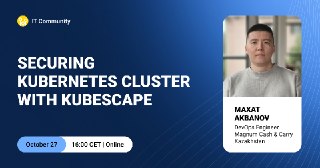
🔐 Kubernetes Security: A Practical Look at Kubescape
Kubernetes helps teams build flexible and scalable infrastructure, but it also introduces new security challenges. How can you identify vulnerabilities and misconfigurations and systematically strengthen the security of your Kubernetes workloads?
📅 On October 27, join us to explore Kubescape — an open-source tool from the CNCF ecosystem for auditing, monitoring, and strengthening Kubernetes security.
🎤 Maxat Akbanov, a DevOps Engineer at Magnum Cash & Carry Kazakhstan, will share his hands-on experience with Kubescape and discuss:
🔹 how to audit a Kubernetes cluster
🔹 how to identify misconfigurations and vulnerabilities;
🔹 what to consider when integrating the tool
🔹 what value Kubescape can bring to your team and organization
🔗 Register here: Registration for the event
Event details:
⏰ Time: 16:00 (CET)
🕒 Duration: 1 hour
🗣️ Language: English
💻 Format: online – we’ll send the stream link to the email provided during registration
See you there! 👋
Kubernetes helps teams build flexible and scalable infrastructure, but it also introduces new security challenges. How can you identify vulnerabilities and misconfigurations and systematically strengthen the security of your Kubernetes workloads?
📅 On October 27, join us to explore Kubescape — an open-source tool from the CNCF ecosystem for auditing, monitoring, and strengthening Kubernetes security.
🎤 Maxat Akbanov, a DevOps Engineer at Magnum Cash & Carry Kazakhstan, will share his hands-on experience with Kubescape and discuss:
🔹 how to audit a Kubernetes cluster
🔹 how to identify misconfigurations and vulnerabilities;
🔹 what to consider when integrating the tool
🔹 what value Kubescape can bring to your team and organization
🔗 Register here: Registration for the event
Event details:
⏰ Time: 16:00 (CET)
🕒 Duration: 1 hour
🗣️ Language: English
💻 Format: online – we’ll send the stream link to the email provided during registration
See you there! 👋
Пост от 08.10.2026 17:02
368
0
2
🧠 AI + Kotlin = Your Own “Second Brain”
Join us on October 15 to explore how to build your own tool for capturing ideas, notes, and thoughts – and then using AI to quickly find whatever you need. Your data stays with you, without unnecessary subscriptions, SaaS lock-in, or reliance on third-party services. 🚀
We’ll cover how to:
📱 Turn Android into a convenient tool for capturing ideas
🤖 Use AI to search and organize your knowledge
⚡ Run your product on Android, Desktop, CLI, and more
🛠️ Build a working version in just one weekend
🎤 Yury Vashchylau – Lead Product Engineer
👉 Join the meetup
Event details:
⏰ Time: 16:00 CEST
🕒 Duration: 60 minutes
🗣️ Language: English
💻 Online: The streaming link will be sent to the email address provided during registration.
🚀 Don’t put your ideas on hold. Register and build your own knowledge system.
See you there!
💼 Our vacancies
Join us on October 15 to explore how to build your own tool for capturing ideas, notes, and thoughts – and then using AI to quickly find whatever you need. Your data stays with you, without unnecessary subscriptions, SaaS lock-in, or reliance on third-party services. 🚀
We’ll cover how to:
📱 Turn Android into a convenient tool for capturing ideas
🤖 Use AI to search and organize your knowledge
⚡ Run your product on Android, Desktop, CLI, and more
🛠️ Build a working version in just one weekend
🎤 Yury Vashchylau – Lead Product Engineer
👉 Join the meetup
Event details:
⏰ Time: 16:00 CEST
🕒 Duration: 60 minutes
🗣️ Language: English
💻 Online: The streaming link will be sent to the email address provided during registration.
🚀 Don’t put your ideas on hold. Register and build your own knowledge system.
See you there!
💼 Our vacancies

Пост от 01.10.2026 17:27
1
0
0
🪤 Do you really need to keep up with every new in-demand skill?
Every month brings a new set of “must-have” skills for the job market. It can feel like you need to learn everything, right now. 🫠
But what if you don’t need to start from scratch?
At the meetup, we’ll explore how to:
🧠 Understand what’s worth learning
💼 Identify what the market is willing to pay you for
🚀 Figure out where to take your career next
🎯 Show employers what makes your expertise valuable
🎤 Kristina Zozulia, Co-founder of The Rolevia, will help us make sense of it all.
👉 Register for the meetup
Event details:
⏰ Time: 17:00 (CEST)
🕒 Duration: 1 hour
🗣 Language: English
💻 Online: we’ll send the streaming link to the email address provided during registration.
See you there! 🚀
Every month brings a new set of “must-have” skills for the job market. It can feel like you need to learn everything, right now. 🫠
But what if you don’t need to start from scratch?
At the meetup, we’ll explore how to:
🧠 Understand what’s worth learning
💼 Identify what the market is willing to pay you for
🚀 Figure out where to take your career next
🎯 Show employers what makes your expertise valuable
🎤 Kristina Zozulia, Co-founder of The Rolevia, will help us make sense of it all.
👉 Register for the meetup
Event details:
⏰ Time: 17:00 (CEST)
🕒 Duration: 1 hour
🗣 Language: English
💻 Online: we’ll send the streaming link to the email address provided during registration.
See you there! 🚀

Пост от 29.09.2026 10:00
1
0
0
☁️🤖 A New Perspective on QA: From Cloud Components to AI
How is QA evolving as applications become more complex and AI becomes part of everyday testing? 👀
📅 October 7 | QA Meetup in Bengaluru
📍 Offline: Sunhive office, Bengaluru
💻 Online: streaming available
🎤 Nishant Gohel – Backend Automation Engineer
Cloud: Tested or Just Trusted?
Practical approaches to testing cloud components, finding issues early, and improving reliability.
🎤 Sanjay Kumar – Founder & Creator of SelectorsHub
Your Daily QA Problems – Solved (With and Without AI)
Real-world QA challenges and practical solutions using AI, automation, and useful tools — including where AI actually helps.
⏰ 19:00 IST / 15:30 CEST
🕒 2 hours | 🗣 English
🔗 Register here
🧠 Two practical talks, real-world examples, and ideas you can use right away.
See you at the meetup! 🚀
How is QA evolving as applications become more complex and AI becomes part of everyday testing? 👀
📅 October 7 | QA Meetup in Bengaluru
📍 Offline: Sunhive office, Bengaluru
💻 Online: streaming available
🎤 Nishant Gohel – Backend Automation Engineer
Cloud: Tested or Just Trusted?
Practical approaches to testing cloud components, finding issues early, and improving reliability.
🎤 Sanjay Kumar – Founder & Creator of SelectorsHub
Your Daily QA Problems – Solved (With and Without AI)
Real-world QA challenges and practical solutions using AI, automation, and useful tools — including where AI actually helps.
⏰ 19:00 IST / 15:30 CEST
🕒 2 hours | 🗣 English
🔗 Register here
🧠 Two practical talks, real-world examples, and ideas you can use right away.
See you at the meetup! 🚀

Пост от 28.09.2026 12:44
1
0
0
🤖 Can a chatbot save your mental health?
IT is intense: deadlines, context-switching, late-night debugging — and AI is making the pace even faster. 🌀
Many of us now use AI not only for work, but to vent, organize thoughts, rehearse difficult conversations, or simply feel “heard” at 2 AM.
And honestly? It helps. ✅
• 24/7 and judgment-free
• Helps structure thoughts
• A great practice partner
But here’s the catch. ⚠️
AI can’t replace a hug, human presence, or real connection.
From a preventive medicine perspective, AI can be a first step — but it should lead toward people, not away from them.
AI should be a bridge, not a bunker. 🌉
💬 Are we using technology to help us connect — or to avoid connecting?
Have you ever used AI to prepare for a difficult conversation?
IT is intense: deadlines, context-switching, late-night debugging — and AI is making the pace even faster. 🌀
Many of us now use AI not only for work, but to vent, organize thoughts, rehearse difficult conversations, or simply feel “heard” at 2 AM.
And honestly? It helps. ✅
• 24/7 and judgment-free
• Helps structure thoughts
• A great practice partner
But here’s the catch. ⚠️
AI can’t replace a hug, human presence, or real connection.
From a preventive medicine perspective, AI can be a first step — but it should lead toward people, not away from them.
AI should be a bridge, not a bunker. 🌉
💬 Are we using technology to help us connect — or to avoid connecting?
Have you ever used AI to prepare for a difficult conversation?