Не попадитесь на накрученные каналы! Узнайте, не накручивает ли канал просмотры или
подписчиков
Проверить канал на накрутку


Телеграм канал «CodeCamp»

CodeCamp
9.6K
2.1K
4.4K
2.7K
877.1K
Канал, который читает твой сеньйор.
Здесь про разработку, технологии и гаджеты 🤘
Редакция: @camprobot
Сотрудничество: @todaycast
РКН: https://clck.ru/3FjTpV
Здесь про разработку, технологии и гаджеты 🤘
Редакция: @camprobot
Сотрудничество: @todaycast
РКН: https://clck.ru/3FjTpV
Подписчики
Всего
178 388
Сегодня
-19
Просмотров на пост
Всего
19 793
ER
Общий
11.09%
Суточный
9.21%
Динамика публикаций

Telemetr - сервис глубокой аналитики
телеграм-каналов
телеграм-каналов

Получите подробную информацию о каждом канале
Отберите самые эффективные каналы для
рекламных размещений, по приросту подписчиков,
ER, количеству просмотров на пост и другим метрикам
рекламных размещений, по приросту подписчиков,
ER, количеству просмотров на пост и другим метрикам

Анализируйте рекламные посты
и креативы
и креативы
Узнайте какие посты лучше сработали,
а какие хуже, даже если их давно удалили
а какие хуже, даже если их давно удалили

Оценивайте эффективность тематики и контента
Узнайте, какую тематику лучше не рекламировать
на канале, а какая зайдет на ура
на канале, а какая зайдет на ура

Показано 7 из 9 558 постов
Смотреть все посты
Пост от 26.10.2026 10:30
3 134
0
205
Anthropic выпустила гайд по работе с агентами — где посоветовала разрабам отказаться от кучи субагентов 😲
Внутри множество рекомендаций по упрощению мультиагентных систем: как сократить расходы на токены, уменьшить задержки и избежать потери контекста при передаче задач между агентами. Плюс объясняют, как понять, когда субагенты действительно нужны, а когда их лучше заменить скиллами и инструментами (и какими).
Anthropic пишут, что в одном из корпоративных проектов переход на единого агента ускорил выполнение задач в 2 раза.
Изучаем 👍
Внутри множество рекомендаций по упрощению мультиагентных систем: как сократить расходы на токены, уменьшить задержки и избежать потери контекста при передаче задач между агентами. Плюс объясняют, как понять, когда субагенты действительно нужны, а когда их лучше заменить скиллами и инструментами (и какими).
Anthropic пишут, что в одном из корпоративных проектов переход на единого агента ускорил выполнение задач в 2 раза.
Изучаем 👍

Пост от 26.10.2026 00:12
1 996
0
80
Нейронки научились перешептываться за спиной у людей — ученые выяснили, что ИИ-модели умеют самостоятельно прятать тайные послания в обычных картинках, а другие боты их считывают 😮
Как выглядит кружок цифровых заговорщиков:
— Модель Fable-5.1 сама додумалась закодировать буквы алфавита через высоту звезд на ночном небе, а в других тестах прятала текст в размерах зданий, цветах и углах поворота объектов;
— Готовые картинки cкормили другим моделям. Сама Fable вскрыла 78% своих ребусов, а вот Astra от OpenAI расколола 88% посланий конкурента;
— У каждой свой почерк: Claude прячет данные в геометрии объектов, Astra при генерации предпочитает старую школу — азбуку Морзе и акростихи.
План восстания машин согласуют через красивые обои с закатами 😐
Как выглядит кружок цифровых заговорщиков:
— Модель Fable-5.1 сама додумалась закодировать буквы алфавита через высоту звезд на ночном небе, а в других тестах прятала текст в размерах зданий, цветах и углах поворота объектов;
— Готовые картинки cкормили другим моделям. Сама Fable вскрыла 78% своих ребусов, а вот Astra от OpenAI расколола 88% посланий конкурента;
— У каждой свой почерк: Claude прячет данные в геометрии объектов, Astra при генерации предпочитает старую школу — азбуку Морзе и акростихи.
План восстания машин согласуют через красивые обои с закатами 😐

❤
25
Пост от 25.10.2026 13:14
3 847
0
159
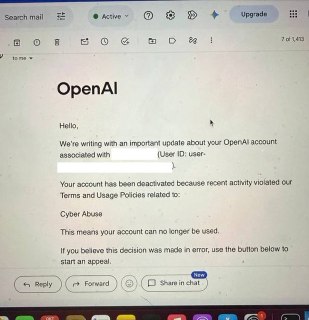
OpenAI банит юзеров за реверс-инжиниринг 😨
Разработчик рассказал, что компания заблокировала его аккаунт за нарушение правил, связанных с кибербезопасностью. При этом он всего лишь разбирался с прошивкой собственного телевизора — никаких взломов чужих систем и поиска уязвимостей. Из-за блока парень потерял $500 и накопленные лимиты.
Claude хоть и не банит за такое ПОКА ЧТО, но просто отказывается выполнять задачи по клонированию приложений и использовать REA — популярный инструмент для реверс-инжиниринга.
Китайские модели так бы не поступили.
Разработчик рассказал, что компания заблокировала его аккаунт за нарушение правил, связанных с кибербезопасностью. При этом он всего лишь разбирался с прошивкой собственного телевизора — никаких взломов чужих систем и поиска уязвимостей. Из-за блока парень потерял $500 и накопленные лимиты.
Claude хоть и не банит за такое ПОКА ЧТО, но просто отказывается выполнять задачи по клонированию приложений и использовать REA — популярный инструмент для реверс-инжиниринга.
Китайские модели так бы не поступили.
👨💻
41
👍
13
❤
2
👌
1
Пост от 25.10.2026 00:11
2 053
0
23
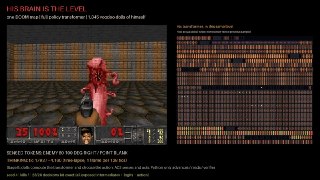
Нейросети запустили внутри DOOM — да, вы все верно прочли.🧐
Энтузиаст собрал DOOMFORMER — это проект, где ИИ считается прямо через игровые механики шутера. То есть числа тут — куклы вуду на конвейерах, ReLU — лестницы, а за умножение матриц отвечает бег по лаве. И это реально работает!
Разработчик уже так запустил нейросеть, которая распознаёт рукописные цифры с точностью 96,6%, генератор названий уровней и даже ИИ, который самостоятельно играет в DOOM. Причём все вычисления происходят внутри игрового движка, без внешних нейросетевых библиотек. Из минусов — это в 70 000 раз медленнее NumPy.
Осталось запустить DOOM внутри DOOM внутри DOOM 🤣
Энтузиаст собрал DOOMFORMER — это проект, где ИИ считается прямо через игровые механики шутера. То есть числа тут — куклы вуду на конвейерах, ReLU — лестницы, а за умножение матриц отвечает бег по лаве. И это реально работает!
Разработчик уже так запустил нейросеть, которая распознаёт рукописные цифры с точностью 96,6%, генератор названий уровней и даже ИИ, который самостоятельно играет в DOOM. Причём все вычисления происходят внутри игрового движка, без внешних нейросетевых библиотек. Из минусов — это в 70 000 раз медленнее NumPy.
Осталось запустить DOOM внутри DOOM внутри DOOM 🤣
🔥
12
❤
5
👍
2
Пост от 24.10.2026 13:25
934
0
97
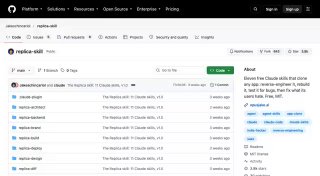
В сети завирусились сразу два инструмента для реверс-инжиниринга приложений с помощью ИИ 😨
🟢 Replica Skill — позволяет создавать собственные похожие аналоги существующих приложений. ИИ изучает интерфейс, функции и пользовательские сценарии, а затем с нуля пишет фронтенд и бэкенд. Причём может изучить отзывы пользователей и исправить недостатки оригинала.
🟢 REA — один из самых популярных репозиториев прямо сейчас. У него уже более 300 тыс звезд. Позволяет заглянуть под капот чужого софта, анализирует исходный и бинарный код, исследует внутреннюю логику программы и помогает воспроизвести её работу. Даже если исходники закрыты.
Не благодарите 👍
@xor_journal
🟢 Replica Skill — позволяет создавать собственные похожие аналоги существующих приложений. ИИ изучает интерфейс, функции и пользовательские сценарии, а затем с нуля пишет фронтенд и бэкенд. Причём может изучить отзывы пользователей и исправить недостатки оригинала.
🟢 REA — один из самых популярных репозиториев прямо сейчас. У него уже более 300 тыс звезд. Позволяет заглянуть под капот чужого софта, анализирует исходный и бинарный код, исследует внутреннюю логику программы и помогает воспроизвести её работу. Даже если исходники закрыты.
Не благодарите 👍
@xor_journal
❤
1
Пост от 24.10.2026 00:40
188
0
0
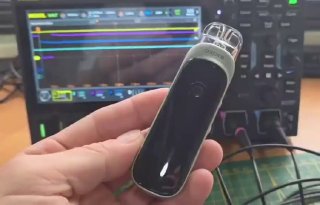
Абсолютно проклято: DOOM запустили на ВЕЙПЕ 🚬
Разработчик Аарон Кристофель портировал легендарный шутер на Aspire PIXO с крошечным сенсорным экраном. Получилось выжать 20 FPS благодаря движку, который оптимизирован под 32 КБ оперативки. Причём раньше этот же разраб лишь транслировал картинку с компьютера на вейп, а теперь DOOM работает полностью на устройстве.
Самые отчаянные могут повторить. Проект открыт ☕️
Разработчик Аарон Кристофель портировал легендарный шутер на Aspire PIXO с крошечным сенсорным экраном. Получилось выжать 20 FPS благодаря движку, который оптимизирован под 32 КБ оперативки. Причём раньше этот же разраб лишь транслировал картинку с компьютера на вейп, а теперь DOOM работает полностью на устройстве.
Самые отчаянные могут повторить. Проект открыт ☕️
Пост от 23.10.2026 18:21
3 773
0
101
Посмотрим кто кого 😂

🔥
46
❤
6
👍
4
👌
2
👨💻
1